




A restaurant menu is no longer something customers only pick up from a table.
Today, people often discover restaurants through Google, social media, maps and food delivery platforms. Before deciding where to eat, they may check the menu, prices, photographs, dietary options and overall brand experience from their phone.
That makes your digital menu an important part of your restaurant’s online presence.
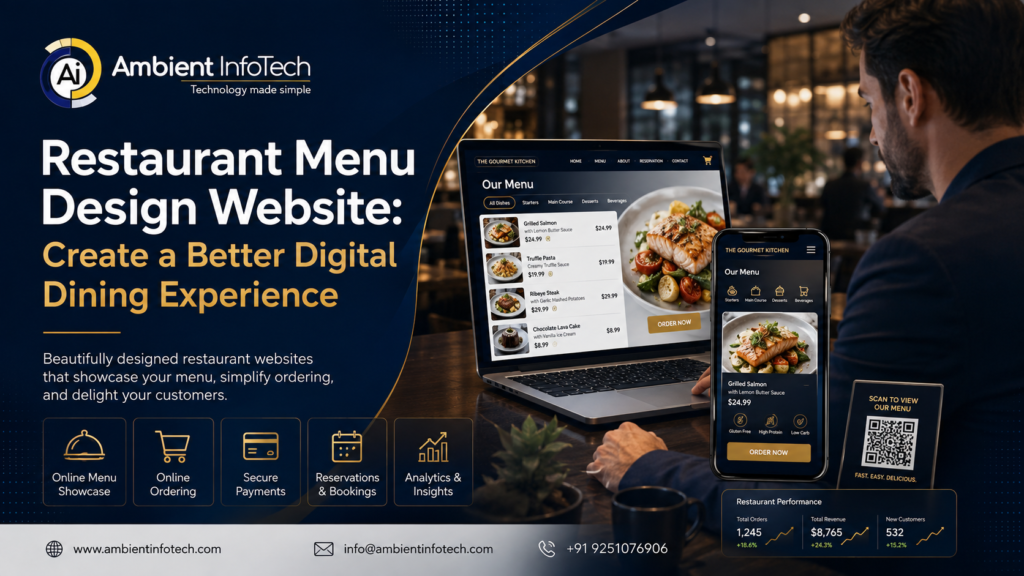
A professionally designed Restaurant Menu Design Website can do much more than display food items. It can showcase your brand, make dishes easier to explore, encourage customers to order and create a smoother digital experience from discovery to dining.
Whether you run a small independent restaurant, café, takeaway, hotel restaurant or multi-location food business, a well-designed online menu can help turn website visitors into customers.
What Is a Restaurant Menu Design Website?
A restaurant menu design website is a digital platform or website section where customers can browse a restaurant’s food and drink offerings online.
Depending on the restaurant’s requirements, it can include:
- Food categories
- Dish names and descriptions
- Prices
- Food photographs
- Ingredients
- Allergen information
- Vegetarian and vegan labels
- Special offers
- Chef recommendations
- Drinks menus
- Dessert menus
- Online ordering
- Table reservations
- Location information
- Contact details
- QR code access
A modern Online Restaurant Menu Design should be easy to navigate on smartphones, tablets and desktops.
The goal is not simply to reproduce a printed menu online. It should be designed specifically for digital users.
Why Restaurants Need a Professional Digital Menu
Imagine a potential customer finds your restaurant on Google.
They visit your website and immediately want to know:
“What do you serve, and how much does it cost?”
If your menu is difficult to find, displayed as a tiny PDF or not updated regularly, you may lose the customer before they ever visit.
A well-designed digital menu solves this problem.
It provides customers with the information they need quickly while presenting your restaurant professionally.
A strong digital menu can help:
- Improve customer experience.
- Increase menu engagement.
- Encourage direct enquiries.
- Support online ordering.
- Promote special dishes.
- Strengthen restaurant branding.
- Reduce reliance on printed menus.
- Make menu updates easier.
- Improve mobile usability.
Key Features of a Restaurant Menu Design Website
1. Mobile-Friendly Menu
Most customers accessing a digital restaurant menu will use a smartphone.
Therefore, your menu needs to work perfectly on smaller screens.
A mobile-friendly menu should have:
- Large readable text
- Clear categories
- Easy scrolling
- Touch-friendly buttons
- Fast loading
- Proper image sizing
- Simple navigation
A customer shouldn’t have to pinch and zoom repeatedly just to read the price of a dish.
2. Attractive Food Photography
Food is visual.
High-quality photography can make dishes significantly more appealing and help customers understand what they are ordering.
Your website can showcase:
- Starters
- Main courses
- Desserts
- Drinks
- Signature dishes
- Seasonal specials
- Chef recommendations
Images should be optimised for website performance without sacrificing visual quality.
3. Easy Menu Categories
A large menu can quickly become overwhelming.
Organise dishes into logical categories such as:
Starters
Small plates, soups, salads and appetisers.
Main Courses
Your primary dishes, grouped where appropriate by cuisine or food type.
Sides
Rice, chips, vegetables, bread and other additions.
Desserts
Cakes, ice cream, puddings and signature desserts.
Drinks
Soft drinks, juices, coffee, tea and other beverages.
Clear categorisation makes browsing much easier.
4. Detailed Dish Descriptions
A dish name alone may not tell customers enough.
Instead of:
Chicken Pasta – £14.95
consider:
Creamy Chicken Pasta – £14.95
Grilled chicken, penne pasta, roasted garlic, parmesan and fresh herbs in a creamy sauce.
This helps customers understand what they are ordering and can make the dish more appealing.
Detailed descriptions can also support search engine optimisation when written naturally.
5. Allergen and Dietary Information
Food businesses need to communicate relevant allergen information clearly and accurately.
Depending on the menu, customers may need to identify:
- Vegetarian options
- Vegan options
- Gluten-related information
- Dairy
- Nuts
- Eggs
- Soy
- Other relevant allergens
The exact information and presentation should be reviewed against the applicable UK food information requirements.
A professional Digital Menu Design can make these details easy to locate without cluttering the page.
6. QR Code Menu Integration
QR codes provide a simple way for customers to access a digital menu.
A restaurant can place QR codes on:
- Dining tables
- Countertops
- Reception desks
- Printed marketing materials
- Packaging
- Promotional displays
Customers scan the code using their phone and immediately access the online menu.
The important point is that the QR code should lead to a genuinely mobile-friendly menu rather than a difficult-to-read document.
7. Online Ordering Integration
For restaurants that offer online ordering, the menu website can connect customers directly to the ordering process.
A customer could:
Browse → Select Dish → Customise → Add to Basket → Pay
This removes unnecessary steps.
Depending on the business model, integrations can support:
- Collection
- Delivery
- Table ordering
- Reservation systems
- Payment gateways
- POS systems
The technology should be selected according to the restaurant’s operational requirements.
8. Restaurant Branding
Your menu should look like it belongs to your restaurant.
A luxury restaurant may require an elegant visual style.
A modern café might prefer a minimalist interface.
A family restaurant may benefit from a brighter, more approachable design.
Branding elements can include:
- Logo
- Colours
- Typography
- Photography
- Icons
- Layout
- Tone of voice
This is where Custom Restaurant Menu Design can make a major difference.
Interactive Restaurant Menus vs PDF Menus
Many restaurants still upload a PDF menu to their website.
While PDFs can be useful, they are not always the best primary digital experience.
| Feature | PDF Menu | Interactive Menu |
|---|---|---|
| Mobile experience | Moderate | Excellent |
| Easy navigation | Limited | Strong |
| SEO potential | Limited | Stronger |
| Menu updates | Requires file replacement | Easy |
| Food imagery | Possible | Highly flexible |
| Ordering integration | Limited | Excellent |
| Analytics | Limited | Strong |
| User experience | Basic | Interactive |
A PDF can still be offered as an additional option, but an HTML-based digital menu usually provides a better customer experience.
How a Restaurant Menu Website Can Support SEO
Your menu isn’t just for customers. It can also contribute to your website’s organic search visibility.
For example, a restaurant might naturally target searches such as:
- Italian restaurant in Manchester
- vegan restaurant in Birmingham
- Indian restaurant menu in Leeds
- seafood restaurant in Brighton
- best Sunday roast in London
A well-structured website can create relevant pages around the restaurant, its location, cuisine and services.
SEO opportunities include:
Menu Page Optimisation
Use descriptive headings and relevant dish information.
Location Optimisation
Include accurate information about the restaurant’s location and areas served.
Structured Data
Where appropriate, use relevant Schema.org structured data to help search engines understand the business and page content.
Image SEO
Optimise image filenames, dimensions, file sizes and alternative text.
Internal Linking
Connect menu pages with:
- About page
- Contact page
- Reservation page
- Location page
- Blog
- Ordering page
This creates a more useful website structure.
Restaurant Menu Design Process
Creating an effective digital menu starts with understanding the restaurant rather than immediately designing screens.
Step 1: Understand the Restaurant
The first stage is learning about:
- Cuisine
- Target customers
- Brand personality
- Menu size
- Locations
- Ordering process
- Existing website
- Business goals
Step 2: Plan the Menu Structure
The menu categories and navigation should be organised before the visual design begins.
Step 3: Create the UI/UX Design
Designers develop the layout, typography, imagery, buttons and navigation.
The objective is to make the menu visually attractive without making it difficult to use.
Step 4: Develop the Website
The approved design is converted into a responsive website.
Step 5: Add Menu Content
Food names, descriptions, prices, images, dietary information and other details are added.
Step 6: Integrate Ordering or Booking
If required, the website can connect to ordering, reservation, payment or POS systems.
Step 7: Test Everything
The website should be tested across:
- Smartphones
- Tablets
- Desktop computers
- Different browsers
Step 8: Launch and Maintain
After launch, menu updates, promotions, seasonal dishes and technical improvements can be managed continuously.
Benefits of a Professional Restaurant Menu Website
Better Customer Experience
Customers can quickly find dishes, prices and information.
More Direct Bookings and Orders
Clear calls to action can encourage visitors to order or reserve a table.
Easier Menu Management
Digital menus can be updated without printing new menus every time a price or dish changes.
Stronger Branding
A professional website reinforces the restaurant’s visual identity.
Better Accessibility
Responsive digital menus can provide a more accessible experience across different devices.
Increased Marketing Opportunities
Your website can promote:
- New dishes
- Seasonal menus
- Special offers
- Events
- Private dining
- Loyalty programmes
How Much Does Restaurant Menu Website Design Cost?
There isn’t a single fixed price because restaurant websites vary significantly in complexity.
Factors affecting cost include:
- Number of pages
- Menu size
- Custom UI/UX design
- Online ordering
- Payment integration
- Reservation integration
- POS integration
- Multiple restaurant locations
- Custom functionality
- Content creation
- Photography
- Ongoing maintenance
A simple digital menu website will naturally cost less than a complete restaurant ordering platform with customer accounts, payments, delivery management and third-party integrations.
The best approach is to define the restaurant’s requirements first and then create a solution around them.
Common Restaurant Menu Website Mistakes
Using a PDF as the Only Menu
A PDF may be difficult to read on smartphones.
Poor Food Photography
Low-quality images can make even excellent dishes look unappealing.
Too Much Text
Customers should be able to scan a menu quickly.
Hidden Prices
Make pricing easy to find unless there is a specific business reason not to display it.
Complicated Navigation
Customers shouldn’t have to click through several pages to find basic menu information.
No Clear Ordering Button
If online ordering is available, make the action obvious.
Ignoring Website Speed
Large unoptimised food images can make pages slow.
Failing to Update the Menu
Outdated dishes or incorrect prices damage customer trust.
How Ambient Infotech Can Help
Creating an effective Restaurant Menu Website Design requires more than making a page look attractive.
It needs thoughtful UI/UX, responsive development, performance optimisation and an understanding of how customers interact with digital menus.
Ambient Infotech provides web development, UI/UX design, ecommerce development, digital marketing and custom software solutions for businesses looking to strengthen their digital presence.
For restaurants, the team can develop solutions that combine:
- Custom restaurant website design
- Digital menu design
- Responsive web development
- QR code menu integration
- Online ordering functionality
- Table reservation integration
- Payment gateway integration
- SEO optimisation
- Mobile-first design
- Website maintenance
- Third-party API integrations
The goal is to create a digital experience that works for both the restaurant and its customers.
A restaurant owner should be able to update dishes, prices or promotions without turning every small change into a complicated development project.
At the same time, customers should be able to access the menu quickly, understand the dishes and take the next step—whether that’s ordering, reserving a table or visiting the restaurant.
Why Choose Ambient Infotech?
Ambient Infotech has 12+ years of experience and 1,200+ projects delivered, supporting businesses with web development, mobile applications, UI/UX, ecommerce and digital marketing.
For a restaurant menu website, that broader technical capability can be valuable because your menu may eventually need to connect with other systems.
For example:
Digital Menu → Ordering → Payment → POS → Customer Data
A scalable website architecture makes it easier to introduce these capabilities as your restaurant grows.
Ambient Infotech can also help restaurants improve their wider online presence through SEO, content and digital marketing.
What Makes a Great Restaurant Menu Website?
A successful digital menu should follow one simple principle:
Make it easy for customers to decide what they want and what they should do next.
That means:
- Clear menu categories
- Attractive food photography
- Simple navigation
- Readable typography
- Accurate pricing
- Dietary information
- Mobile responsiveness
- Fast loading
- Clear ordering or booking buttons
- Consistent branding
When these elements work together, your digital menu becomes more than an online version of your printed menu.
It becomes a valuable part of your restaurant’s sales and marketing system.
Frequently Asked Questions
1. What is a restaurant menu design website?
A restaurant menu design website is a digital platform where customers can browse food and drink menus, view prices and descriptions, check dietary information and, where available, place orders or make reservations.
2. Should a restaurant use a digital menu instead of a PDF?
An interactive digital menu generally provides a better mobile experience, easier navigation, faster updates and greater opportunities for ordering and SEO. A PDF can still be offered as an additional option.
3. Can a restaurant menu website include online ordering?
Yes. A restaurant menu website can integrate online ordering, payment gateways, delivery or collection options and, depending on the setup, POS and restaurant management systems.
4. Can customers access a restaurant menu through a QR code?
Yes. A QR code can direct customers to a mobile-friendly online menu. QR codes can be displayed on tables, counters, packaging and promotional materials.
5. How much does a restaurant menu website cost?
The cost depends on the design, number of pages, menu complexity, ordering functionality, integrations and custom features required.
6. Can the restaurant update its menu after the website launches?
Yes. A content management system can allow restaurant staff to update dishes, descriptions, prices, availability and promotions without needing to rebuild the entire website.
7. Is a restaurant menu website good for SEO?
Yes. A properly structured menu and restaurant website can support SEO through useful content, location information, internal linking, structured data and optimised images.
8. Why choose Ambient Infotech for restaurant website design?
Ambient Infotech combines UI/UX design, website development, SEO, ecommerce and digital marketing expertise to create scalable digital solutions for restaurants and other businesses.