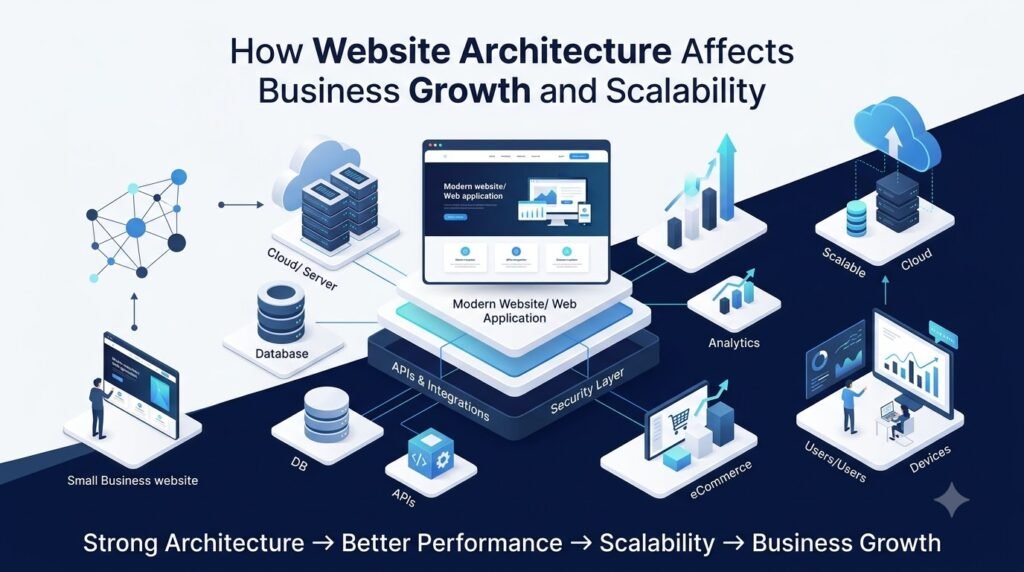





How Website Architecture Affects Business Growth and Scalability
A website is more than a collection of web pages. Behind every fast, reliable, and functional website is an underlying structure that determines how its frontend, backend, database, integrations, servers, and security systems work together. This structure is known as website architecture.
For a small business, a basic website may initially be enough to generate leads and establish an online presence. However, as the business grows, requirements can change quickly. More visitors may arrive, product catalogs may expand, new services may be introduced, and additional systems may need to be connected.
If the website architecture was not designed with these requirements in mind, growth can expose technical limitations.
A well-planned architecture, on the other hand, can provide a stronger foundation for website scalability, performance, security, and long-term business growth.
What Is Website Architecture?
Website architecture refers to the overall technical structure and organization of a website. It describes how different components communicate and work together to deliver content and functionality to users.
Depending on the project, website architecture may include:
- Frontend structure and user interface
- Backend application and business logic
- Database structure
- APIs and third-party integrations
- Hosting and server infrastructure
- Content management systems
- Authentication and security layers
- URL and navigation structure
- Caching and performance systems
- External services and platforms
Think of website architecture like the foundation and infrastructure of a building. The visible website is what customers see, but the underlying architecture determines how effectively the website can operate as the business grows.
For example, an online store with 100 products and a few hundred monthly visitors may have relatively simple requirements. The same business may eventually have thousands of products, significantly more orders, multiple payment methods, shipping integrations, customer accounts, and marketing systems.
The architecture needs to accommodate that change.
How Website Architecture Supports Business Growth
Good website architecture for business growth should align technology with the company’s current requirements while leaving enough flexibility for future needs.
Adding New Products and Services
Businesses rarely remain static.
A company may start by offering five services and later expand into several service categories. An eCommerce business may begin with a small product catalog and eventually manage thousands of products.
A well-organized architecture makes it easier to add new content, products, categories, features, and business rules without rebuilding the entire website.
Supporting More Customers
Growth often means more users interacting with the website.
The architecture needs to handle increased requests efficiently, particularly when users are performing resource-intensive activities such as:
- Searching products
- Creating accounts
- Placing orders
- Uploading information
- Checking order status
- Requesting personalized services
A system designed only for a small number of users may experience performance problems when demand increases.
Expanding Into New Markets
Businesses may eventually expand into new cities, countries, currencies, or languages.
Architecture can influence how easily a website supports features such as:
- Multiple languages
- Multiple currencies
- Regional pricing
- Different tax rules
- Location-based shipping
- Multiple domains or subdomains
- Regional content
Planning for these possibilities early can reduce the complexity of future expansion.
Supporting Internal Business Operations
A website may also become an important part of internal workflows.
For example, an eCommerce platform may connect website orders with inventory, accounting, shipping, CRM, and ERP systems.
Good architecture helps these systems communicate reliably instead of requiring employees to manually move information between platforms.
Why Website Scalability Matters
Website scalability refers to a website’s ability to handle increasing demand without requiring a complete redesign or causing unacceptable performance problems.
There is an important difference between building a website that works today and building a scalable website architecture that can support future requirements.
A growing business may need to accommodate:
- More website visitors
- More registered users
- Larger product catalogs
- More orders and transactions
- Larger databases
- Additional integrations
- New features
- More administrative users
Scalability does not necessarily mean building the most complex system from day one.
Instead, the architecture should be appropriate for the business’s current size while allowing sensible paths for future expansion.
For a small company, a straightforward architecture may be more practical. As requirements become more complex, additional services, caching, infrastructure improvements, database optimization, or modular components may become appropriate.
Website Architecture and Performance
Website performance is influenced by many factors, and architecture is one of them.
A website can become slower when inefficient code, database queries, APIs, servers, or assets create unnecessary processing and loading.
Important architectural considerations include:
Efficient Code Structure
Well-organized frontend and backend code can make applications easier to maintain and optimize.
Database Queries
Poorly designed queries can become increasingly expensive as the amount of stored data grows.
Caching
Caching can reduce repeated processing by temporarily storing frequently requested information.
Image Optimization
Large images can increase page loading times, particularly on mobile devices. Appropriate formats, compression, responsive images, and efficient delivery can improve performance.
Content Delivery Networks
A CDN can help deliver static assets such as images, stylesheets, and JavaScript files from geographically distributed servers.
Server Configuration
Hosting resources, server configuration, storage, memory, and processing capacity all influence how a website handles requests.
API Performance
If a website depends on multiple external APIs, slow or unreliable integrations can affect the overall user experience.
Good web development architecture considers these dependencies instead of treating performance as something to address only after the website becomes slow.
How Website Architecture Supports SEO
Website architecture does not guarantee search engine rankings, but it can provide a stronger technical foundation for search engine crawling and user experience.
Important areas include:
Logical URL Structure
URLs should be organized logically and consistently so users and search engines can understand the relationship between pages.
Website Navigation
Clear navigation helps visitors discover important content and can make larger websites easier for search engines to crawl.
Internal Linking
Relevant internal links can connect related pages and help users discover additional information.
Crawlability
Technical problems such as broken links, incorrect redirects, blocked resources, or poorly structured pages can make it harder for search engines to access website content.
Page Speed and Mobile Experience
Performance and mobile usability are important parts of creating a quality website experience.
XML Sitemaps
XML sitemaps can help search engines discover URLs that should be crawled.
Canonical URLs
Canonical tags can help communicate the preferred version of a page when similar or duplicate URLs exist.
Structured Data
Relevant structured data can help search engines better understand certain types of content.
Redirect Management
Proper redirects are particularly important during website migrations, redesigns, URL changes, and restructuring.
The key point is that architecture supports SEO from a technical perspective; it is only one part of a broader SEO strategy.
Website Security and Architecture
Security should be considered during architectural planning rather than added as an afterthought.
Depending on the project, a secure architecture may include:
- HTTPS
- Secure authentication
- Role-based access control
- Protected APIs
- Secure database access
- Input validation
- Regular software updates
- Secure third-party integrations
- Backup and recovery procedures
- Monitoring and logging
- Appropriate separation of services
For example, an administrator should not automatically have the same permissions as a regular customer.
Similarly, sensitive database credentials and private configuration information should not be exposed through the frontend.
Security is directly connected to business continuity. A security incident, data loss, or prolonged website outage can affect customers and business operations.
Why eCommerce Website Architecture Requires Extra Planning
For an eCommerce business, architecture becomes particularly important because many systems must work together.
A typical online store may involve:
- Product catalogs
- Product variants
- Shopping carts
- Customer accounts
- Checkout
- Payment gateways
- Inventory
- Order management
- Shipping providers
- Tax calculations
- CRM systems
- ERP systems
- Marketing platforms
Consider an online store that starts with 200 products and later grows to 10,000 products.
The business may also receive significantly more orders and store much larger quantities of customer, product, and transaction data.
If the underlying architecture does not scale appropriately, problems can appear in product searches, database queries, checkout, inventory synchronization, or order processing.
For this reason, eCommerce website architecture should consider not only the storefront but also the complete flow of information from product discovery through order fulfillment.
High-traffic events, promotions, and seasonal sales should also be considered when planning infrastructure and performance strategies.
Monolithic vs Modular Website Architecture
There is no single architecture that is appropriate for every business.
Two commonly discussed approaches are monolithic and modular architecture.
Monolithic Architecture
In a monolithic application, major functionality is generally contained within one application structure.
Potential advantages include:
- Simpler initial development
- Easier deployment for smaller projects
- Fewer components to manage
- Straightforward development for simpler requirements
Potential limitations may include:
- Larger applications can become harder to maintain
- Changes may affect multiple parts of the application
- Scaling individual functions can be more difficult
Modular Architecture
A modular approach separates functionality into distinct components or services.
For example, product management, authentication, payments, notifications, and other functionality may be organized into separate modules.
Potential advantages include:
- Better separation of responsibilities
- Easier maintenance of larger systems
- Greater flexibility for adding functionality
- Individual components can sometimes be scaled independently
Potential limitations include:
- Greater development complexity
- More infrastructure and monitoring requirements
- More complicated communication between components
For a small business website, a highly distributed architecture may introduce unnecessary complexity.
For a larger platform with multiple teams, integrations, and rapidly changing functionality, modular approaches may provide useful flexibility.
The appropriate choice depends on requirements, budget, technical expertise, expected growth, and operational needs.
APIs and Third-Party Integrations
Modern websites rarely operate in complete isolation.
APIs allow websites to communicate with external systems and services such as:
- Payment gateways
- CRM platforms
- ERP systems
- Shipping providers
- Inventory platforms
- Marketing tools
- Analytics services
- Mobile applications
For example, when a customer places an order, an eCommerce website may send information to a payment gateway, update inventory, create an order record, notify a shipping provider, and send information to a CRM.
A well-designed integration architecture keeps these connections organized and reduces unnecessary dependency between systems.
This becomes particularly important when a business needs to replace or add a third-party service.
The goal should be to make integrations manageable rather than allowing one external service to become deeply embedded throughout the entire application.
Database Architecture and Business Growth
The database is one of the most important parts of a website’s backend.
Imagine an eCommerce store with:
- 500 products
- 2,000 customers
- 5,000 orders
A few years later, the business might have:
- 20,000 products
- 100,000 customers
- Millions of order records
The way data is organized can significantly affect how efficiently the application retrieves and updates information.
Important database considerations include:
- Logical data organization
- Relationships between records
- Indexing
- Query efficiency
- Data validation
- Database optimization
- Backup procedures
- Data retention
- Increasing storage requirements
For example, a product search that works quickly with a small database may become slower as millions of records are added if queries and indexes have not been planned appropriately.
Database architecture should therefore be considered part of the long-term scalability strategy.
How to Choose the Right Website Architecture
Before starting a new website or redesign, businesses should consider both current and future requirements.
Ask questions such as:
1. How much traffic is expected?
Consider current traffic as well as realistic future growth.
2. How many pages or products will the website contain?
A small company website and a large eCommerce catalog have very different data requirements.
3. What integrations are required?
List payment gateways, CRM, ERP, shipping, inventory, marketing, and other systems.
4. Will the business expand into new markets?
Consider languages, currencies, countries, regions, and domain structures.
5. Are multiple user roles required?
For example, customers, administrators, vendors, employees, and managers may require different permissions.
6. Is eCommerce involved?
Online stores generally require additional planning around transactions, inventory, payments, and orders.
7. What future features are expected?
Think about mobile apps, customer portals, subscriptions, advanced search, personalization, automation, or other planned functionality.
8. What security requirements exist?
Consider customer information, payment-related systems, employee access, and regulatory requirements relevant to the business.
9. What is the maintenance budget?
A more complex architecture may require additional development, hosting, monitoring, and maintenance resources.
10. How important are performance and uptime?
Businesses that rely heavily on online transactions may have different infrastructure requirements than a basic informational website.
Signs Your Website Architecture May Need Improvement
Your website may need architectural improvements if you regularly experience problems such as:
- The website becomes slow as traffic increases
- New features take disproportionately long to develop
- Frequent technical errors occur
- Database queries become slow
- Third-party integrations are difficult to maintain
- Mobile performance is poor
- Security vulnerabilities repeatedly appear
- Developers struggle to understand or modify the codebase
- Website downtime occurs frequently
- Small changes unexpectedly break unrelated functionality
- The website cannot easily support new business requirements
These signs do not automatically mean that a complete rebuild is necessary.
Sometimes targeted improvements such as database optimization, caching, infrastructure changes, code refactoring, or replacing a problematic integration may address the underlying issue.
A professional technical assessment can help determine the appropriate approach.
How Professional Web Development Can Help
Choosing the right architecture requires an understanding of both technology and business requirements.
A professional website development company can evaluate the current system, identify technical limitations, and design an architecture appropriate for the business.
At Ambient Infotech, our approach focuses on understanding the business requirement before selecting the technical solution.
Our professional web development services can support businesses with:
- Website architecture planning
- Custom website development
- Scalable web development
- Website performance optimization
- eCommerce development
- API development and integration
- Third-party system integrations
- Security improvements
- Website maintenance
- Existing website optimization
- Custom software and digital solutions
For businesses planning a new website, redesign, or digital platform, architecture can be considered alongside design, functionality, budget, and long-term business goals.
You can naturally explore Ambient Infotech’s Web Development, Web Design, eCommerce Development, Custom Software Development, and Digital Solutions services through the relevant service pages.
Website Architecture Should Support the Business, Not Complicate It
Website architecture is ultimately about creating a technical foundation that supports the way a business operates and grows.
A small business may need a relatively straightforward architecture today. A growing eCommerce company may eventually require more advanced database optimization, integrations, infrastructure, caching, and modular functionality.
The important point is not to build the most complicated system possible.
Instead, businesses should choose an architecture that is appropriate for their current requirements while providing a practical path for future growth.
A well-planned architecture can make it easier to add functionality, manage increasing traffic, improve performance, integrate new services, protect important systems, and maintain the website over time.
For this reason, website architecture should be viewed as a long-term business investment rather than simply a technical implementation.
Frequently Asked Questions
What is website architecture?
Website architecture is the overall technical structure of a website, including its frontend, backend, database, APIs, hosting infrastructure, security, integrations, and content organization.
Why is website architecture important for business growth?
A well-planned architecture can make it easier for a business to add features, support more users, manage larger amounts of data, integrate external systems, and adapt to changing requirements.
What is scalable website architecture?
Scalable website architecture is designed to accommodate increasing traffic, users, data, transactions, and functionality without requiring an unnecessary complete rebuild.
Does website architecture affect SEO?
Yes, architecture can support important technical SEO areas such as crawlability, navigation, URL structure, internal linking, performance, mobile usability, sitemaps, canonical URLs, and redirects. However, architecture alone does not guarantee search engine rankings.
Is a modular architecture better than a monolithic architecture?
Neither approach is universally better. A simpler architecture may be appropriate for a smaller website, while a modular approach can be useful for larger and more complex platforms. The right choice depends on business requirements, complexity, budget, and expected growth.
When should a business review its website architecture?
Architecture should be reviewed when a website experiences recurring performance problems, frequent errors, difficult integrations, increasing maintenance costs, security concerns, or when the business is planning significant expansion or new functionality.
Build a Website Ready for Your Next Stage of Growth
Whether you are launching a new website, redesigning an existing platform, expanding an eCommerce business, or integrating multiple business systems, architecture should be considered from the beginning.
Ambient Infotech helps businesses plan and develop web solutions based on their current requirements and future objectives. If your existing website is becoming difficult to maintain or you are planning a new scalable digital platform, our team can help you evaluate the technical requirements and identify an appropriate development approach.
Explore our web development and digital solutions services to discuss your next website project.