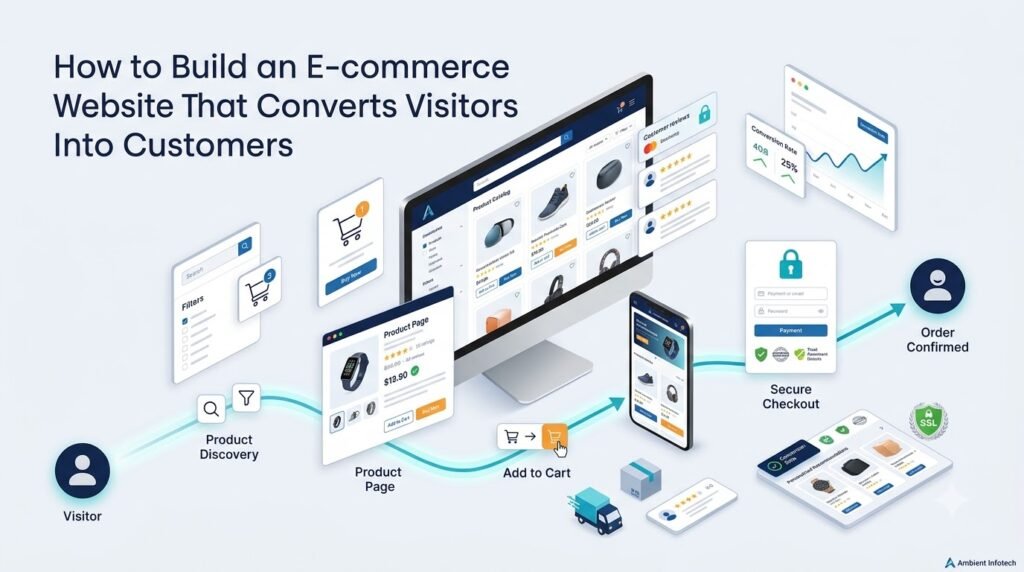





A business can have excellent products, competitive pricing, and plenty of website traffic—but still struggle to generate online sales. Why? Because attracting visitors is only the first step. An eCommerce website must make it easy and comfortable for visitors to move from discovering a product to making a purchase.
A successful online store helps customers find the right products, understand their value, trust the business, complete checkout easily, and return for future purchases.
This is the foundation of a conversion-focused eCommerce website.
From intuitive navigation and compelling product pages to mobile responsiveness, fast performance, secure payments, and transparent policies, every part of the website can influence the customer journey.
In this guide, we’ll explore how businesses can build an eCommerce website that converts visitors into customers while creating a better online shopping experience.
1. What Does It Mean for an E-commerce Website to Convert?
In eCommerce, a conversion generally means a visitor completes a desired action.
The most important conversion for an online store is usually a completed purchase. However, other actions can also be valuable during the customer journey, including:
- Adding a product to the cart
- Starting the checkout process
- Creating an account
- Signing up for product updates
- Adding products to a wishlist
- Requesting product information
For example, a visitor who adds a product to their cart but does not purchase has demonstrated buying intent, even though the final purchase conversion has not occurred.
Understanding these different actions helps businesses identify where customers are progressing and where they may be experiencing friction.
2. Understand Your Target Customers First
Good eCommerce website development starts before writing code or designing pages. Businesses first need to understand who they are selling to.
Consider:
- Who is your target customer?
- What problem are they trying to solve?
- What influences their purchasing decision?
- What concerns might prevent them from buying?
- What price range are they comfortable with?
- Which devices do they commonly use?
- How do they compare products before purchasing?
These insights can influence almost every part of your online store.
For example, a fashion retailer may need strong product photography, size information, customer reviews, and easy category browsing. A B2B equipment supplier may require detailed specifications, downloadable documents, quotation requests, and technical product information.
Understanding your audience helps determine the right:
- Website structure
- Navigation
- Content
- Product presentation
- Calls-to-action
- Checkout process
3. Create Simple and Intuitive Website Navigation
Customers should not have to work hard to find what they need.
A clear eCommerce website design should organize products into logical categories and provide multiple ways to discover them.
Useful navigation features include:
- Clear category menus
- Subcategories
- Product search
- Filters
- Sorting options
- Breadcrumb navigation
- Internal links
- Related product sections
A typical structure might look like:
Home → Category → Subcategory → Product → Cart → Checkout
For larger stores, search and filtering become particularly important. A customer looking for a specific product should be able to reach relevant results without navigating through numerous unrelated pages.
Avoid creating unnecessarily complicated menus or categories. The goal is to reduce the effort required to find products.
4. Design Product Pages That Help Customers Make Decisions
The product page is one of the most important parts of an online store. It should answer the questions a customer would normally ask before purchasing.
Product Images
High-quality images help shoppers understand what they are buying.
Consider using:
- Multiple product angles
- Zoom functionality
- Close-up images
- Product-in-use photographs
- Consistent image sizes and presentation
For some products, videos or demonstrations can also provide useful context.
Product Information
A product page should clearly communicate:
- Product name
- Price
- Key benefits
- Features
- Specifications
- Materials
- Available sizes or variations
- Stock availability
- Delivery information
- Return information
Avoid relying only on technical specifications. Explain the practical value of the product as well.
Product Reviews
Genuine customer reviews can give shoppers additional information and help them understand other customers’ experiences.
Reviews are particularly useful when customers are comparing similar products.
Clear Calls-to-Action
Important actions should be easy to identify.
Examples include:
- Add to Cart
- Buy Now
- Add to Wishlist
The CTA should be noticeable without overwhelming the rest of the page.
5. Build Trust Before Asking Customers to Buy
Customers need confidence before they provide personal information or payment details.
Trust should therefore be built throughout the shopping journey rather than introduced only during checkout.
Important trust elements include:
- HTTPS-secured website
- Secure payment processing
- Clear return and refund policies
- Shipping information
- Business contact details
- Customer reviews
- Product ratings
- Privacy policy
- Terms and conditions
- Recognizable payment methods
- Transparent pricing
For example, displaying delivery information directly on a product page can answer an important customer question before they reach checkout.
The more uncertainty customers experience, the more questions they may have before completing a purchase.
6. Make the Checkout Process Simple
A complicated checkout can introduce unnecessary friction.
Common checkout problems include:
- Too many form fields
- Mandatory account creation
- Unexpected charges
- Confusing navigation
- Limited payment methods
- Unclear shipping information
- Poor error messages
- Complicated multi-step processes
A practical checkout experience should:
- Keep the customer focused on completing the order.
- Minimize unnecessary information requests.
- Clearly display the order summary.
- Show shipping costs and applicable taxes.
- Provide appropriate payment options.
- Allow guest checkout where suitable.
- Clearly explain validation errors.
- Make the final order button easy to identify.
There is no single checkout structure that works for every business. The right approach depends on the products, customers, market, and business requirements.
7. Optimize the Website for Mobile Shopping
Mobile-first thinking is essential when developing a modern eCommerce website.
Customers may browse products, compare options, add items to their cart, and complete purchases from smartphones.
A mobile-friendly store should provide:
- Responsive layouts
- Touch-friendly buttons
- Simple mobile navigation
- Easy product search
- Fast-loading images
- Convenient cart access
- Readable product descriptions
- Mobile-friendly checkout forms
A website that looks excellent on a desktop but is difficult to use on a smartphone can create unnecessary friction.
Mobile responsiveness should therefore be considered from the beginning of the eCommerce website design process rather than added as an afterthought.
8. Improve Website Speed and Performance
Performance is both a technical and user-experience consideration.
Slow pages can make browsing frustrating, particularly when customers are viewing product images, filtering large catalogs, or moving through checkout.
Businesses can improve performance through techniques such as:
- Image optimization
- Lazy loading
- Efficient code
- Browser and server caching
- Content delivery networks
- Minified assets
- Optimized database queries
- Reliable hosting
- Reducing unnecessary third-party scripts
Performance should also be monitored across different devices and network conditions.
The goal is not simply to achieve a technical performance score but to create a smoother shopping experience.
9. Use Search and Filters to Help Customers Find Products
As a product catalog grows, website search becomes increasingly important.
A useful eCommerce search experience can include:
- Autocomplete
- Search suggestions
- Relevant search results
- Product filters
- Price ranges
- Brand filters
- Size filters
- Colour filters
- Availability filters
- Sorting options
For example, a customer shopping for shoes might want to filter products by size, colour, brand, price, and availability.
Good product discovery reduces the amount of effort required to find relevant products and can make large catalogs easier to navigate.
10. Use Calls-to-Action Strategically
A call-to-action tells users what they can do next.
Common eCommerce CTAs include:
- Shop Now
- Add to Cart
- Buy Now
- Proceed to Checkout
- Subscribe
- Request a Quote
Effective CTAs should be:
- Clear
- Action-oriented
- Easy to find
- Consistent
- Appropriate to the customer’s current stage
For example, “Add to Cart” makes sense on a product page, while “Proceed to Checkout” is more appropriate after products have been added to the cart.
Too many competing CTAs can make a page confusing, so businesses should prioritize the most relevant next action.
11. Offer Multiple Convenient Payment Options
Customers have different payment preferences, and available options can vary by market.
Depending on the business and target audience, payment methods may include:
- Credit and debit cards
- Digital wallets
- Bank-based payment methods
- Buy-now-pay-later options where appropriate
- Cash on delivery where relevant
- Local payment methods
The objective is not to add every possible payment method. Instead, businesses should offer payment options that are relevant to their customers.
Payment integrations should also be implemented securely using reputable payment providers and appropriate security practices.
12. Be Transparent About Pricing, Shipping, and Returns
Unexpected costs can create uncertainty during the buying process.
Customers should be able to understand:
- Product price
- Discounts
- Applicable taxes
- Shipping charges
- Delivery estimates
- Product availability
- Return policy
- Refund policy
For example, showing shipping costs only at the final checkout step may surprise customers who expected a different total.
Transparent information helps shoppers make informed decisions and understand the complete cost of their order.
13. Build an SEO-Friendly E-commerce Website
A well-designed store also needs to be discoverable.
eCommerce website development should include SEO considerations from the beginning.
Important elements include:
- SEO-friendly URLs
- Descriptive product titles
- Useful product descriptions
- Optimized category pages
- Meta titles and descriptions
- Internal linking
- Image alt text
- Structured data
- XML sitemaps
- Canonical URLs
- Mobile responsiveness
- Good website performance
For example, a descriptive URL such as:
/mens-running-shoes
is generally more meaningful than a URL containing unnecessary technical parameters.
SEO can help qualified users discover products through search engines, but rankings depend on many factors and are not guaranteed.
14. Personalization and Product Recommendations
Relevant recommendations can help customers discover additional products.
Examples include:
- Related products
- Similar products
- Frequently bought together
- Recently viewed products
- Personalized recommendations
For example, an online electronics store might show compatible accessories on a product page.
However, personalization should be relevant and implemented with appropriate privacy considerations. Recommendations should help customers rather than overwhelm them with unrelated products.
15. Reduce Cart Abandonment
Cart abandonment occurs when customers add products to their cart but leave before completing the purchase.
Possible causes include:
- Unexpected shipping costs
- Complicated checkout
- Limited payment options
- Slow website performance
- Website errors
- Lack of trust
- Forced account registration
- Poor mobile experience
- Unclear delivery information
Businesses can address these issues by reviewing the complete checkout journey.
For example, if analytics show that many customers leave after seeing shipping charges, the business can examine whether shipping information is being communicated clearly enough earlier in the journey.
The solution should be based on actual customer behaviour rather than assumptions.
16. Use Analytics to Understand Customer Behaviour
An eCommerce website should be measurable.
Analytics can help businesses understand what happens after visitors arrive.
Useful metrics include:
| Metric | What It Helps Understand |
|---|---|
| Conversion rate | How many visitors complete the desired action |
| Add-to-cart rate | How frequently visitors add products |
| Checkout initiation | How many users begin checkout |
| Cart abandonment | Where potential purchases are being lost |
| Average order value | Typical value of completed orders |
| Traffic sources | Where visitors are coming from |
| Product performance | Which products attract engagement and purchases |
| Returning customers | Repeat shopping behaviour |
| Device performance | Differences between desktop and mobile users |
Analytics does not automatically explain why customers leave, but it can identify areas that deserve further investigation.
17. A/B Testing and Continuous Optimization
Launching an eCommerce website is not the end of the optimization process.
Businesses can test different elements, including:
- Product page layouts
- CTA placement
- Product images
- Headlines
- Navigation
- Search functionality
- Checkout flow
- Promotional messaging
For example, a business might test two different product-page layouts and compare how users interact with them.
Testing should be based on reliable data and a clearly defined objective. Businesses should avoid assuming that one design will always perform better across every audience and product category.
18. Technical Features Behind a High-Performing E-commerce Website
The customer-facing experience depends heavily on the technical foundation underneath it.
A scalable online store may require:
- Reliable hosting
- Scalable architecture
- Secure APIs
- Database optimization
- Payment gateway integration
- Inventory synchronization
- Shipping integrations
- CRM integration
- ERP integration
- Order management
- Security monitoring
- Backup and recovery systems
For example, if inventory is managed through an ERP system, integrating it with the eCommerce platform can help keep product availability consistent across systems.
Likewise, API integrations can connect an online store with payment providers, shipping platforms, customer-management systems, and other business tools.
This is where professional eCommerce web development becomes more than simply creating web pages.
19. Common E-commerce Website Mistakes to Avoid
Before launching an online store, review the following areas:
- Complicated navigation
- Poor product photography
- Weak product descriptions
- Slow website performance
- Poor mobile experience
- Hidden shipping costs
- Complicated checkout
- Lack of trust signals
- Limited payment options
- Poor website search
- Missing product filters
- Poor error handling
- No analytics tracking
- Ignoring post-launch optimization
Even a visually attractive website can struggle if customers cannot easily find products, understand pricing, trust the business, or complete checkout.
20. How a Professional E-commerce Development Company Can Help
Building a conversion-focused online store often requires coordination between design, development, content, integrations, performance, security, and ongoing maintenance.
An experienced eCommerce development company can help businesses plan and implement areas such as:
- eCommerce website planning
- UI/UX design
- Custom eCommerce development
- Product catalog development
- Payment gateway integration
- Shipping integration
- CRM and ERP integration
- API integrations
- Responsive development
- SEO-friendly architecture
- Website performance optimization
- Security implementation
- Ongoing maintenance
For businesses with complex requirements, a custom approach can also make it easier to connect the online store with existing operational systems.
If you are evaluating an eCommerce website design company, consider its ability to understand your business processes—not just its ability to create attractive interfaces.
21. E-commerce Conversion Checklist
Before launching or redesigning an online store, use this checklist:
- Clear website navigation
- Fast-loading pages
- Mobile-friendly design
- High-quality product images
- Detailed product information
- Customer reviews
- Clear calls-to-action
- Transparent pricing
- Clear shipping information
- Simple checkout
- Multiple relevant payment options
- Secure website
- Easy product search and filtering
- SEO-friendly structure
- Analytics tracking
- Ongoing testing and optimization
Conclusion
A successful eCommerce website is more than an online product catalog. It is a complete digital shopping platform designed around the customer’s journey.
From the first visit to product discovery, comparison, checkout, payment, and repeat purchase, every stage can influence the overall shopping experience.
The key components include:
Good UX + Product Presentation + Trust + Performance + Simple Checkout + Mobile Experience + Technical Foundation + Continuous Optimization
Businesses should therefore approach eCommerce website development as an ongoing process rather than a one-time project. Customer behaviour changes, product catalogs evolve, technologies improve, and new opportunities for optimization appear over time.
If you are planning a new online store or looking to improve an existing one, Ambient Infotech can help with eCommerce website planning, UI/UX design, custom development, integrations, performance optimization, and ongoing website support.
Explore your eCommerce requirements with the Ambient Infotech team and build an online shopping experience aligned with your business goals.
Frequently Asked Questions
1. What makes an eCommerce website convert visitors into customers?
A conversion-focused eCommerce website makes it easy for customers to discover products, understand their value, trust the business, and complete checkout. Navigation, product presentation, performance, mobile usability, payment options, and checkout experience all contribute to the customer journey.
2. How can website design affect eCommerce conversions?
Website design affects how easily customers navigate the store, understand products, identify important information, and complete actions. Clear layouts and intuitive navigation can reduce unnecessary friction during shopping.
3. What should a good eCommerce product page include?
A product page should generally include high-quality images, a clear title, pricing, product benefits, specifications, availability, delivery information, reviews where available, and an obvious call-to-action.
4. How can businesses reduce cart abandonment?
Businesses can investigate potential causes such as unexpected costs, complicated checkout, limited payment options, slow pages, unclear delivery information, and poor mobile usability. Analytics can help identify where customers leave the purchasing journey.
5. Why is mobile optimization important for eCommerce?
Customers increasingly browse and shop using mobile devices. A responsive layout, touch-friendly controls, readable content, fast-loading pages, and mobile-friendly checkout can make the shopping experience easier on smaller screens.
6. How does website speed affect online shopping?
Website performance affects how quickly customers can browse products, use filters, view images, and move through checkout. Slow pages can introduce friction and make the shopping experience less convenient.
7. How can an eCommerce development company improve a website’s conversion experience?
An eCommerce development company can help evaluate and improve website architecture, UI/UX, product catalogs, checkout, payment integrations, APIs, performance, mobile responsiveness, security, analytics, and other technical components that support the customer journey.