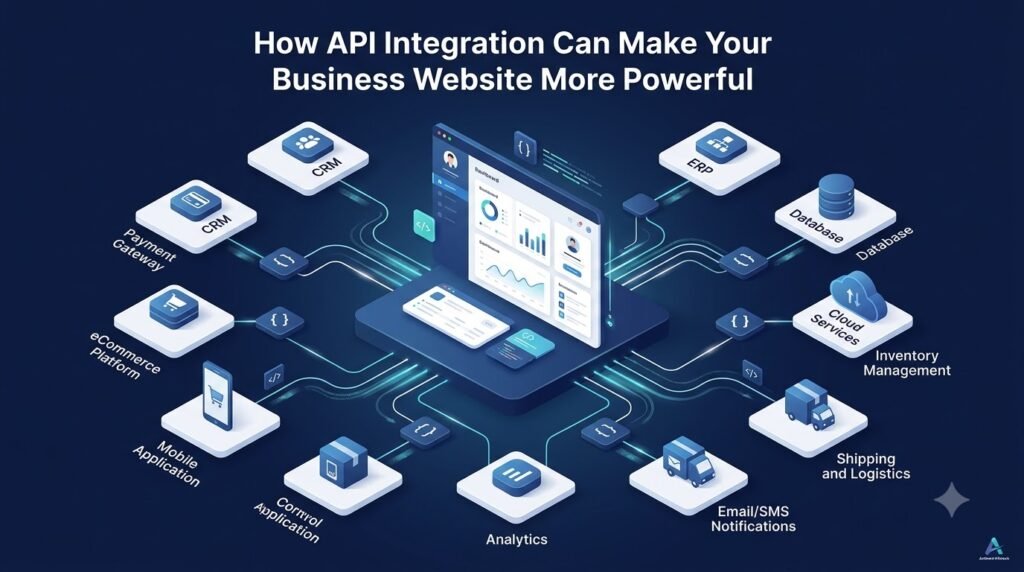





A modern business website is rarely just a collection of web pages. Today, customers expect websites to provide real-time information, multiple payment options, personalized experiences, order tracking, online bookings, instant notifications, and much more.
Behind many of these features are APIs.
A business website may need to communicate with a payment gateway, CRM, ERP, inventory system, shipping provider, accounting platform, email service, mobile application, or analytics system. APIs make this communication possible by allowing different software systems to exchange information and work together.
This is where API integration becomes valuable. By connecting your website with the tools your business already uses, you can reduce manual work, automate repetitive processes, improve data flow, and create a more connected digital experience.
In this guide, we will explain what API integration is, how it works, its benefits for businesses and eCommerce websites, common integration types, security considerations, challenges, and when a business should consider custom API integration.
What Is an API?
API stands for Application Programming Interface.
In simple terms, an API is a communication mechanism that allows different software applications to exchange information or request actions from one another.
Think about a restaurant.
You sit at a table and tell the waiter what you want. The waiter takes your order to the kitchen, the kitchen prepares it, and the waiter brings the result back to you.
An API works in a similar way. One application sends a request, the API communicates with another system, and the required information or result is returned.
For example, a website could use an API to:
- Retrieve product information
- Process a payment
- Check inventory
- Send customer information to a CRM
- Calculate shipping charges
- Retrieve order tracking information
- Send an SMS or email
- Check appointment availability
APIs can therefore act as a bridge between different software systems.
What Is API Integration?
An API and API integration are related, but they are not exactly the same thing.
An API provides a way for software systems to communicate.
API integration is the actual process of connecting your website or application with another system through its API.
For example:
Website → Payment Gateway
The website can send payment information to the payment provider and receive the payment status.
Website → CRM
A contact form submission can automatically create a lead in the CRM.
Website → Shipping Provider
An eCommerce website can request shipping rates, create shipments, and retrieve tracking information.
Website → Inventory System
Product stock information can be exchanged between the website and inventory platform.
Website → Email/SMS Platform
The website can trigger notifications such as OTPs, order confirmations, or appointment reminders.
This means API integration can connect the different parts of a business’s digital ecosystem rather than keeping each system isolated.
Why Do Business Websites Need API Integration?
Many businesses use several software platforms to manage different operations. The website may handle customers and orders, while another system manages inventory, another manages accounting, and another handles marketing.
Without integration, employees may have to enter the same information into multiple systems manually.
For example, when a customer places an order, someone might need to:
- Check the payment manually.
- Enter the order into another system.
- Update inventory.
- Create a shipping request.
- Copy the tracking number.
- Send an email to the customer.
This approach can take time and increase the possibility of data-entry errors.
With appropriate API integrations, these systems can exchange information automatically.
The major benefits can include:
- Automation of repetitive tasks
- Faster information exchange
- Reduced manual data entry
- Better data consistency
- Improved customer experience
- Faster business operations
- Easier connection with existing software
- Greater flexibility as the business grows
How API Integration Makes a Website More Powerful
1. Automates Repetitive Tasks
One of the biggest advantages of API integration is automation.
Instead of employees repeatedly transferring information between systems, APIs can allow applications to exchange that information automatically.
For example:
- New website enquiry → CRM
- New order → Inventory system
- Completed payment → Order system
- New customer → Marketing platform
- Shipment request → Courier system
This can reduce administrative work and allow employees to focus on tasks that require human decision-making.
2. Enables Real-Time Data
API integration can allow websites to retrieve updated information when it is required.
Depending on the connected systems and integration design, this may include:
- Product availability
- Delivery status
- Currency exchange rates
- Shipping charges
- Payment status
- Customer information
- Booking availability
For example, an eCommerce website can communicate with a shipping provider to calculate available shipping options rather than requiring an employee to manually check rates.
Real-time data can make digital experiences more convenient and can also help businesses make decisions using more current information.
3. Improves Customer Experience
Customers generally expect websites to be fast, convenient, and informative.
API integration can support experiences such as:
- Multiple payment methods
- Faster checkout
- Real-time order tracking
- Personalized customer accounts
- Automated notifications
- Live delivery information
- Online booking
- Current product availability
For example, after an order is shipped, a connected shipping system can provide tracking information that the website can display to the customer.
The customer does not necessarily need to contact customer support simply to ask where an order is.
4. Connects Multiple Business Systems
A website can become a central interface that communicates with several business platforms.
Depending on the business, these may include:
- CRM systems
- ERP platforms
- Accounting software
- Inventory management systems
- Shipping providers
- Payment gateways
- Marketing platforms
- Customer support systems
Instead of treating each platform as a separate system, API integration can create a connected workflow between them.
5. Supports Business Automation
Consider a typical eCommerce order:
Customer places order → Payment confirmed → Inventory updated → Order sent for fulfilment → Shipping label generated → Tracking number returned → Customer notified
If each stage is handled manually, the process can become time-consuming.
With appropriate API integrations, information can move between the relevant systems automatically.
This does not mean every process should be completely automated. Businesses still need appropriate validation, monitoring, exception handling, and human oversight where necessary.
Common Types of API Integrations for Business Websites
Payment Gateway Integration
Payment APIs can connect websites with online payment services.
They may support functions such as:
- Payment processing
- Payment verification
- Transaction status
- Refunds
- Order confirmation
A properly designed payment integration can help connect the checkout process with the business’s order-management workflow.
CRM Integration
A CRM integration can send website leads and customer information directly into a customer relationship management platform.
For example, when someone submits a contact form, the website could send the relevant information to the CRM automatically.
This can reduce manual lead entry and help sales teams manage enquiries more efficiently.
ERP Integration
ERP integrations can connect websites with broader business management systems.
Depending on the ERP and business requirements, information may include:
- Orders
- Products
- Inventory
- Customers
- Pricing
- Operational data
This can be particularly useful for businesses where the website is only one part of a larger operational system.
Shipping and Logistics Integration
Shipping APIs can help eCommerce websites communicate with logistics providers.
Possible functionality includes:
- Shipping rate calculation
- Shipment creation
- Tracking information
- Delivery status
- Address validation
This can make fulfilment and customer communication more connected.
Inventory Integration
An inventory API can synchronize stock information between an online store and an inventory management system.
For example, when a product is purchased, the relevant system can receive the order information and update inventory according to the configured workflow.
Email and SMS Integration
Websites can integrate with communication platforms to trigger:
- OTP messages
- Order confirmations
- Shipping notifications
- Appointment reminders
- Marketing communications
The exact functionality depends on the communication provider and its API capabilities.
Social Media and Marketing Integration
APIs can also connect websites with selected marketing and social platforms where supported.
These integrations may help businesses exchange data or automate certain marketing workflows.
Analytics Integration
API integrations can also support reporting and analytics by transferring or retrieving website and business data for analysis.
This can help organizations bring information from different systems into reporting workflows.
API Integration for eCommerce Websites
eCommerce is one area where API integration can have a particularly important role.
An online store may need to communicate with:
- Payment gateways
- ERP systems
- CRM systems
- Inventory platforms
- Shipping providers
- Accounting software
- Marketing automation platforms
- Customer support systems
- Mobile applications
Consider an online retailer receiving a new order.
The customer completes checkout and payment. The payment status can be communicated to the order system. The order information can then be shared with inventory or ERP software. Once the order is ready, shipping information can be sent to the courier system. The resulting tracking information can then be returned to the website and communicated to the customer.
This connected workflow can reduce duplicate data entry and help different teams work from more consistent information.
For businesses planning API integration for eCommerce, the important consideration is not simply connecting as many platforms as possible. Each integration should have a clear business purpose and appropriate error handling, security, and monitoring.
API Integration and Website Scalability
As a business grows, its website often needs to communicate with more systems and support more functionality.
A well-planned API architecture can make it easier to:
- Add new services
- Connect additional platforms
- Launch mobile applications
- Introduce new website features
- Expand into new markets
- Connect internal systems
- Replace or upgrade third-party services
However, APIs alone do not automatically make a website scalable.
Scalability also depends on factors such as:
- Overall application architecture
- Database design
- Hosting infrastructure
- Security
- Performance
- API management
- Monitoring
- Caching
- Error handling
API integration should therefore be considered as part of the broader website architecture.
API Integration and Business Automation
Businesses can use APIs to connect different steps in repetitive workflows.
Common examples include:
- Lead management
- Order processing
- Customer onboarding
- Invoice generation
- Inventory synchronization
- Shipping updates
- Appointment scheduling
- Customer notifications
When appropriate tasks are automated, employees can spend less time transferring information between systems and more time handling customer relationships, strategy, problem-solving, and other higher-value activities.
API Security: What Businesses Should Know
Connecting systems also introduces security responsibilities.
Depending on the integration, important security considerations may include:
- Authentication
- Authorization
- HTTPS
- API keys
- OAuth where appropriate
- Access control
- Input validation
- Rate limiting
- Secure credential storage
- Monitoring and logging
- Proper error handling
- Protection of customer data
Security requirements depend on what information is being transferred and which systems are involved.
For example, an integration handling payment-related or personal customer information may require stronger security controls than a simple public data integration.
API security should therefore be considered during the planning stage rather than added only after development is complete.
Challenges of API Integration
API integration can provide significant benefits, but it also comes with challenges.
Common issues include:
- Third-party API limitations
- Authentication complexity
- Poor or incomplete documentation
- Rate limits
- API version changes
- Different data formats
- Integration maintenance
- Security risks
- External service downtime
- Error handling
- Dependency on third-party platforms
For example, a third-party provider may change its API version or discontinue an older endpoint. A website relying on that API may then require development changes.
Professional planning, documentation, monitoring, testing, and maintenance can help businesses manage these risks.
REST APIs, SOAP APIs, and Modern API Approaches
Businesses may encounter several API technologies.
REST APIs
REST is a widely used approach for web-based APIs. REST APIs commonly exchange data using formats such as JSON.
SOAP APIs
SOAP is another API communication standard that is often encountered in established enterprise systems.
JSON and XML
JSON and XML are data formats used to structure information exchanged between systems.
Webhooks
Webhooks allow one system to automatically send information to another when a particular event occurs.
GraphQL
GraphQL provides an approach where clients can request specific data from an API rather than relying solely on predefined response structures.
There is no single API approach that is correct for every project. The appropriate technology depends on the systems being connected and the project’s technical and business requirements.
API vs Webhook: What’s the Difference?
The basic difference is how communication is initiated.
API request:
One system asks another system for information or requests an action.
Webhook:
One system automatically sends information to another system when a particular event occurs.
For example, after a successful payment, a payment provider may send a webhook notification to the website indicating that the payment event occurred.
Both APIs and webhooks can be useful in connected business workflows.
How to Plan API Integration for a Website
Before starting a website API integration project, businesses should consider the following checklist:
- Identify the business requirement.
- Identify the systems that need to communicate.
- Check whether the required API is available.
- Review the API documentation.
- Understand authentication requirements.
- Define what data needs to be exchanged.
- Plan error handling.
- Consider security requirements.
- Check API rate limits.
- Plan testing.
- Monitor the integration after launch.
- Prepare for future API version changes.
Starting with the business requirement is important. The objective should be to solve a genuine business or customer problem rather than integrating a service simply because an API is available.
When Should a Business Consider Custom API Integration?
Custom API integration can become useful when existing systems do not communicate directly.
A business may consider it when:
- Existing software does not connect directly with the website.
- Multiple business systems are disconnected.
- Manual data entry is increasing.
- Customers need real-time information.
- eCommerce operations are becoming more complex.
- The company is launching a mobile application.
- The business requires a custom workflow.
- Existing software needs to communicate with a new platform.
In these situations, a custom integration can be designed around the actual business workflow rather than forcing employees to work around disconnected systems.
How Professional Web Development Can Help
API integration is not only a technical connection between two systems. A successful integration also requires understanding the business workflow, data requirements, security considerations, error scenarios, and long-term maintenance requirements.
A professional web development team such as Ambient Infotech can help businesses with:
- API integration planning
- Custom API development
- Third-party API integration
- Payment gateway integration
- CRM and ERP integration
- eCommerce integrations
- Shipping integrations
- API security
- Testing and debugging
- API monitoring
- Website architecture
- Long-term maintenance
The right approach depends on the business, existing technology stack, third-party platforms, and specific integration requirements.
Conclusion
A modern website does not have to operate as an isolated digital presence.
With the right API integration, a website can communicate with payment gateways, CRMs, ERPs, inventory systems, shipping providers, communication platforms, analytics tools, and other business applications.
This can support:
- Business automation
- Better data flow
- Improved customer experience
- Real-time information
- Connected business systems
- Reduced manual work
- Greater flexibility
- Future expansion
However, effective API integration requires more than simply connecting two systems. Security, architecture, data handling, testing, monitoring, error management, and ongoing maintenance all need to be considered.
If your current website requires employees to repeatedly transfer information between different systems, it may be worth reviewing where API integration could simplify your workflow. Ambient Infotech can help businesses evaluate integration requirements and develop websites and connected digital solutions around their specific business processes.
Frequently Asked Questions
1. What is API integration in a website?
API integration is the process of connecting a website or application with another software system through an API so that the systems can exchange information or perform actions.
2. Why is API integration important for businesses?
API integration can connect different business systems, reduce repetitive data entry, support automation, improve information flow, and enable websites to provide functionality from external platforms.
3. How does API integration improve eCommerce websites?
eCommerce websites can use APIs to connect with payment gateways, inventory systems, ERP platforms, CRM software, shipping providers, accounting systems, and other services. This can help create more connected order and fulfilment workflows.
4. Can API integration automate business processes?
Yes. Depending on the available APIs and business requirements, integrations can automate workflows such as lead management, order processing, inventory synchronization, shipping updates, invoice generation, and customer notifications.
5. Are API integrations secure?
API integrations can be designed with security controls such as authentication, authorization, HTTPS, access restrictions, input validation, rate limiting, secure credential storage, monitoring, and logging. The appropriate security measures depend on the systems and data involved.
6. How much does API integration cost?
There is no single fixed cost for API integration. Pricing depends on factors such as API complexity, the number of systems being connected, authentication requirements, data volume, development effort, testing, security requirements, and ongoing maintenance.
7. When should a business consider custom API integration?
A business may consider custom API integration when its existing software does not connect directly, manual data entry is increasing, multiple systems are disconnected, customers need real-time information, or the business requires a workflow that standard integrations cannot provide.