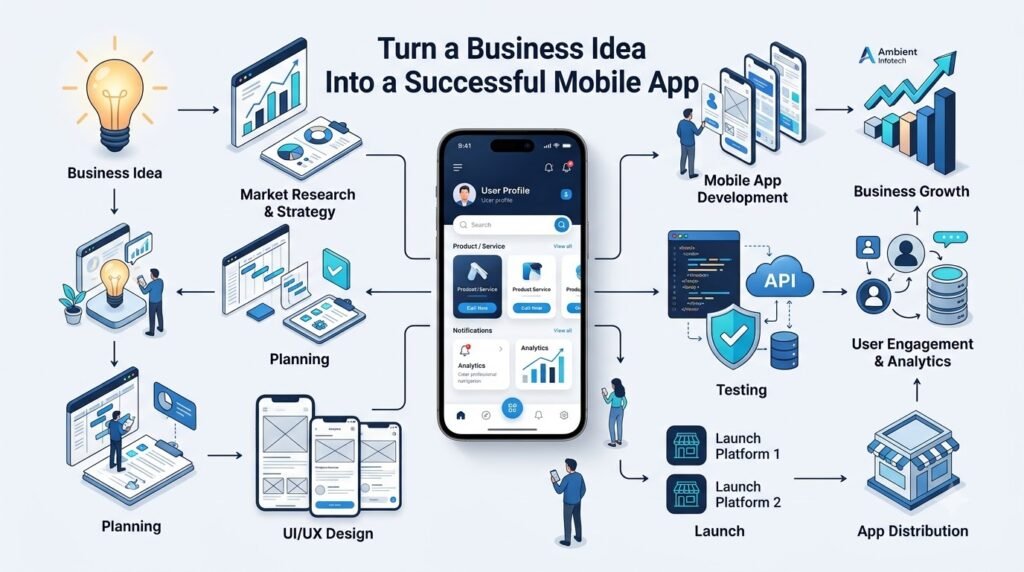





Having a great business idea is exciting, but turning that idea into a useful mobile application requires much more than writing code. A successful app starts with a clear understanding of the problem, the people who experience it, and the business objective behind the product.
Whether you are an entrepreneur, startup founder, small business owner, or an established company planning digital transformation, the mobile app development process should begin with research and planning. From validating the concept and defining core features to designing the user experience, selecting technology, testing, launching, and improving the product, every stage can influence the final result.
This guide explains how to turn a business idea into a structured mobile product and what to consider throughout the mobile app development process.
1. Start by Clearly Defining Your Business Idea
Before hiring developers or discussing technology, turn your broad business idea into a clearly defined app concept.
Ask yourself:
- What problem will the application solve?
- Who experiences this problem?
- How will the app solve it?
- Why would someone use it instead of an existing solution?
- What makes the proposed solution different?
- How will the application support the business financially?
For example, imagine a local fitness business wants to help customers book personal training sessions. Instead of simply saying, “We need a fitness app,” the concept could become:
“A mobile application that allows customers to discover trainers, view available time slots, book sessions, make payments, and receive reminders.”
This definition gives the development team a much clearer starting point.
A good app development strategy connects the customer’s problem with a measurable business objective.
2. Identify Your Target Audience
An application should be designed around its users rather than around a list of technologies or features.
Research your target audience and understand:
- Age and demographics
- Location
- Digital behavior
- Common pain points
- Purchasing behavior
- Technology preferences
- Expectations from similar applications
- Problems users currently face
For example, an app designed for busy professionals may need fast navigation, simple booking, digital payments, and notifications. An application designed for older users may require larger touch targets, simpler navigation, and highly readable content.
Understanding your users early can prevent unnecessary features from entering the product roadmap.
3. Validate the App Idea Before Investing Heavily
Not every good-sounding idea solves a problem people are willing to pay for or regularly use. Before committing a large development budget, validate the concept.
Useful validation methods include:
Competitor Research
Study similar applications to understand their features, pricing, reviews, strengths, and common complaints.
Customer Interviews
Talk directly with potential users. Ask about their current problems rather than only asking whether they like your proposed idea.
Surveys
Surveys can help identify patterns across a larger group of potential users.
Landing Pages
A simple landing page can communicate the concept and measure early interest.
Prototype Testing
An interactive prototype can allow potential users to experience the proposed workflow before full development begins.
Validation does not guarantee that an application will succeed, but it can help businesses identify assumptions and potential problems earlier.
4. Define the Core Features
One of the most common challenges in business mobile app development is deciding what should actually be built.
Start by dividing features into three groups.
Must-Have Features
These are essential to the application’s primary purpose.
Examples may include:
- Registration and login
- User profiles
- Search
- Product or service listings
- Booking
- Payments
- Order management
- Notifications
Nice-to-Have Features
These improve the experience but may not be essential for the initial release.
Examples include:
- Advanced filters
- Wishlist
- Social login
- Referral programs
- Personalization
- Advanced notifications
Future Features
These can be considered after the product has real user feedback.
Examples might include:
- AI-powered recommendations
- Advanced analytics
- Loyalty systems
- Additional integrations
- Automation features
Prioritizing features keeps the initial product focused and can make mobile app development services easier to plan and estimate.
5. Build an MVP First
A Minimum Viable Product (MVP) is an initial version of an application containing the essential functionality required to solve the primary user problem.
MVP app development allows businesses to:
- Test the core concept
- Get the product to real users sooner
- Collect practical feedback
- Identify usability problems
- Understand which features users actually need
- Avoid spending heavily on unproven functionality
An MVP should not mean an unreliable or unfinished application. It should provide a focused, usable experience around the most important customer problem.
After launch, the product can evolve based on actual usage rather than assumptions.
6. Plan the User Experience and App Design
Good mobile app UI UX design should make the application easy to understand and use.
Before development begins, plan:
- User journeys
- Wireframes
- Navigation
- Information architecture
- Onboarding
- Calls to action
- Visual hierarchy
- Accessibility
- Design components
- Error and empty states
For example, an eCommerce app should make it easy for users to discover products, review product information, add items to a cart, complete payment, and track orders.
A complicated interface can create unnecessary friction even when the underlying technology works correctly.
7. Choose the Right Technology
Technology should be selected according to the application’s requirements rather than simply following the latest trend.
Native Development
Native Android and iOS development uses platform-specific technologies and can be appropriate when an application requires deep platform integration or specific device capabilities.
Examples include:
- Kotlin for Android
- Swift for iOS
Cross-Platform Development
Cross-platform frameworks can allow businesses to develop applications for multiple platforms using a shared codebase.
Examples include:
- Flutter
- React Native
The right approach depends on factors such as:
- Budget
- Timeline
- Performance requirements
- Platform requirements
- Device-specific functionality
- Maintenance needs
- Third-party integrations
- Future expansion
There is no single technology that is appropriate for every application.
8. Plan the Backend and App Architecture
The mobile application is only one part of the complete system. Most business applications also require a backend that handles data and business operations.
Depending on the product, the backend may include:
- APIs
- Database systems
- Authentication
- Authorization
- Cloud infrastructure
- Admin dashboards
- Payment integrations
- Push notifications
- Third-party APIs
- Data synchronization
- Server-side business logic
For example, when a customer books a service through an app, the backend may need to check availability, create the booking, process payment, notify the service provider, and store the transaction.
A well-planned architecture can make future expansion and scalable mobile app development easier.
9. Prioritize Security From the Beginning
Security should be considered throughout the mobile application development lifecycle rather than added immediately before launch.
Depending on the application, security considerations may include:
- Secure authentication
- Authorization controls
- Encrypted communication
- Secure API design
- Password protection
- Token management
- Input validation
- Secure local storage
- Payment security
- Privacy controls
- Security testing
Applications handling payments, personal information, business data, or sensitive customer information may require additional security controls.
Regular testing and updates are important because security requirements can change as the application and its technology ecosystem evolve.
10. Develop the Mobile App
Once the requirements, designs, architecture, and technology have been established, development can begin.
A typical workflow includes:
- Finalizing requirements
- Preparing technical specifications
- Creating UI/UX designs
- Setting up the development architecture
- Developing the mobile frontend
- Building backend services and APIs
- Connecting the database
- Implementing authentication
- Integrating third-party services
- Developing core features
- Conducting testing and quality assurance
Successful development also requires communication between business stakeholders, designers, developers, and QA professionals.
Clear documentation and regular reviews can help identify changes before they become expensive to implement.
11. Test the Application Thoroughly
Testing is an essential part of mobile app development, not an optional final step.
Depending on the application, testing can include:
- Functional testing
- UI testing
- Usability testing
- API testing
- Performance testing
- Security testing
- Payment testing
- Device testing
- Network testing
- Crash testing
- Android and iOS compatibility testing
Test the application across different screen sizes, operating system versions, devices, and network conditions.
An application that works correctly on a developer’s device may behave differently on an older smartphone, a slower network, or a different operating system version.
12. Launch the App on App Stores
After testing and final preparation, the application can be submitted to the relevant app stores.
For Google Play Store and Apple App Store, businesses should prepare items such as:
- App icon
- Screenshots
- App description
- Privacy information
- Permissions
- Version information
- Store metadata
- Required policy information
App store requirements can change, so businesses should review the relevant requirements during the release process.
The launch itself should also be planned. Marketing communication, customer support, analytics, onboarding, and monitoring should be ready around the release.
13. Measure User Behavior After Launch
Launching the application is the beginning of the product improvement cycle, not the end.
Analytics can help businesses understand how people actually use the product.
Useful metrics may include:
- Downloads
- Active users
- Retention
- Session duration
- Conversion rate
- Feature usage
- Cart abandonment
- User drop-off
- Crash rate
- Customer feedback
The most useful metrics depend on the application’s business model.
For example, an eCommerce application may focus on product discovery, conversion, cart abandonment, and repeat purchases, while a booking application may focus more heavily on searches, completed bookings, cancellations, and retention.
Metrics should be connected to specific business objectives rather than collected simply because they are available.
14. Continuously Improve the App
Customer expectations, operating systems, devices, and business requirements change over time.
A mobile application may therefore require:
- Bug fixes
- Performance improvements
- Security updates
- New features
- UX improvements
- OS compatibility updates
- Personalization
- Integration updates
- A/B testing where appropriate
A practical product improvement cycle is:
Launch → Measure → Learn → Improve → Release → Repeat
This approach allows businesses to make product decisions based on actual user behavior and feedback.
15. Common Mistakes Businesses Make When Building Mobile Apps
Building Without Validating the Idea
A business may invest heavily before discovering that users have different needs. Conduct research and validation before finalizing the product scope.
Trying to Include Too Many Features
A large feature list can increase development time, complexity, and maintenance requirements. Start with the core problem.
Ignoring UX
A technically functional application can still be difficult to use. Plan user journeys and test the interface with representative users.
Choosing Technology Only Because It Is Popular
A technology should fit the product’s requirements, team capabilities, integrations, and long-term maintenance needs.
Underestimating Backend Requirements
Mobile applications often depend on APIs, databases, authentication, dashboards, integrations, and cloud infrastructure.
Ignoring Security
Security should be part of architecture and development from the beginning.
Not Testing Real Devices
Emulators are useful, but real-device testing can reveal usability, performance, hardware, and compatibility issues.
Focusing Only on Downloads
Downloads do not necessarily indicate meaningful business usage. Track metrics connected to your actual objectives.
Not Planning for Scalability
Architecture should account for potential growth, especially when the application is expected to support increasing users, transactions, or data.
Ignoring Post-Launch Maintenance
An application needs ongoing updates, monitoring, bug fixes, security improvements, and compatibility work.
16. How Much Does It Cost to Develop a Mobile App?
There is no reliable single price for mobile app development because the cost depends on the project’s scope and technical requirements.
Important cost factors include:
- Number of platforms
- Number and complexity of features
- UI/UX requirements
- Backend complexity
- API integrations
- Payment systems
- Admin dashboard
- Third-party services
- Development technology
- Testing requirements
- Security requirements
- Maintenance and support
For example, a basic informational application will generally have very different requirements from an eCommerce platform with payments, inventory management, customer accounts, notifications, analytics, and an administrative system.
Businesses should define requirements and scope before requesting a detailed development estimate.
17. When Should You Work With a Mobile App Development Company?
Professional development support can be useful when an application involves complex requirements or when a business does not have an internal product and engineering team.
A development partner can be particularly useful for:
- Custom mobile applications
- Complex backend systems
- Payment integrations
- Third-party APIs
- Multi-platform development
- Scalable architecture
- Enterprise applications
- Security-sensitive applications
- Custom dashboards
- Long-term maintenance
An experienced team can help translate business requirements into technical specifications while coordinating design, development, testing, deployment, and future improvements.
18. Why Choose Ambient Infotech for Mobile App Development?
Turning an idea into a working digital product requires coordination between business planning, design, technology, and ongoing support.
Ambient Infotech provides technology solutions covering mobile app development and custom software development, helping businesses translate their requirements into practical digital products.
Depending on project requirements, the development process can include:
- Business requirement analysis
- Product planning
- UI/UX design
- Mobile app development
- Backend and API development
- Third-party integrations
- Testing and quality assurance
- Deployment support
- Maintenance
- Scalability planning
- Custom software development
Instead of treating development as only a coding task, businesses can approach the project as a complete product lifecycle—from understanding the problem through launch and continuous improvement.
If you have a mobile app idea and want to understand its technical requirements, features, development approach, or potential scope, you can discuss the concept with the Ambient Infotech team.
19. Practical Roadmap: From Business Idea to Mobile App
A simple roadmap for transforming an idea into an application is:
Business Idea → Market Research → Idea Validation → Feature Planning → MVP → UI/UX Design → Technology Selection → Development → Testing → Launch → Analytics → Continuous Improvement
Business Idea
Define the customer problem and business objective.
Market Research
Understand the audience, competitors, and existing solutions.
Idea Validation
Test assumptions with potential users and early prototypes.
Feature Planning
Separate essential functionality from future enhancements.
MVP
Build a focused version that addresses the primary problem.
UI/UX Design
Create intuitive user journeys, wireframes, and interface designs.
Technology Selection
Choose an appropriate development approach based on requirements.
Development
Build the mobile application, backend, APIs, database, and integrations.
Testing
Verify functionality, usability, security, performance, and compatibility.
Launch
Prepare the application for Google Play Store and Apple App Store distribution.
Analytics
Measure user behavior and business performance.
Continuous Improvement
Use feedback and data to improve the product over time.
20. Mobile App Development Checklist
Before launching your application, review the following:
- ✓ Business problem clearly defined
- ✓ Target audience identified
- ✓ Market researched
- ✓ Competitors analyzed
- ✓ Idea validated
- ✓ Core features prioritized
- ✓ MVP scope defined
- ✓ UX/UI planned
- ✓ Technology selected
- ✓ Backend architecture planned
- ✓ Security requirements defined
- ✓ Testing strategy prepared
- ✓ Analytics implemented
- ✓ App Store and Play Store requirements reviewed
- ✓ Post-launch maintenance planned
Conclusion
Turning a business idea into a successful mobile app is a structured process rather than a single development task. The strongest starting point is not a technology choice—it is a clear understanding of the customer problem and the business objective.
From validating the concept and prioritizing features to designing the user experience, selecting suitable technology, building scalable architecture, implementing security, testing thoroughly, and measuring real-world usage, every stage contributes to the overall product.
Businesses should also recognize that an app does not stop evolving after launch. User feedback, analytics, technology changes, security requirements, and business goals can all influence future releases.
With a clear product strategy and the right mobile app development approach, a business idea can be transformed into a practical digital product that can be tested, improved, and expanded over time.
If you are planning a new application or need custom mobile app development for an existing business, Ambient Infotech can help you evaluate the requirements and plan the development journey around your business objectives.
Frequently Asked Questions
1. How do I turn my business idea into a mobile app?
Start by defining the customer problem, identifying your target audience, researching competitors, validating the idea, and prioritizing the core features. Then plan the UX/UI, select appropriate technology, develop an MVP, test it, launch, and continuously improve it based on user feedback.
2. How do I validate a mobile app idea?
You can validate an idea through customer interviews, surveys, competitor research, landing pages, prototypes, and early user testing. The goal is to understand whether the proposed solution addresses a genuine customer problem.
3. What features should a business app have?
Features depend on the business model and target users. Common features include registration, profiles, search, filters, notifications, payments, booking or ordering, reviews, location services, and an admin dashboard. Start with features essential to the application’s core purpose.
4. Should I build an MVP before the full app?
An MVP can be useful when you want to test the core concept with real users before investing in a larger product. It should provide a focused and usable experience rather than simply being an incomplete version of the final application.
5. How much does mobile app development cost?
The cost depends on factors such as platform, features, UI/UX complexity, backend requirements, integrations, payments, testing, security, and maintenance. A detailed estimate is more reliable after the requirements and scope have been defined.
6. Should I build an Android app, iOS app, or both?
The decision depends on your target audience, geographic market, budget, required functionality, and business objectives. Native development can be considered when platform-specific capabilities are important, while cross-platform development can be suitable when supporting multiple platforms efficiently is a priority.
7. How long does it take to develop a mobile app?
Development time varies significantly based on the application’s scope and complexity. A simple application may require substantially less time than a complex platform involving payments, real-time features, multiple integrations, custom backend systems, and administrative tools.
8. Why should businesses work with a mobile app development company?
A professional development company can help with requirements analysis, product planning, UI/UX design, application development, backend architecture, integrations, testing, deployment, and maintenance. This can be particularly useful for businesses building complex or custom applications without an internal development team.